AP Management Script Description
The AP Management script is a comprehensive and customizable job management system. It provides both server-side and client-side functionality to support dynamic job hierarchies, employee permissions, financial oversight, job advertisements, and target systems through a polished and responsive NUI interface.
Core Features
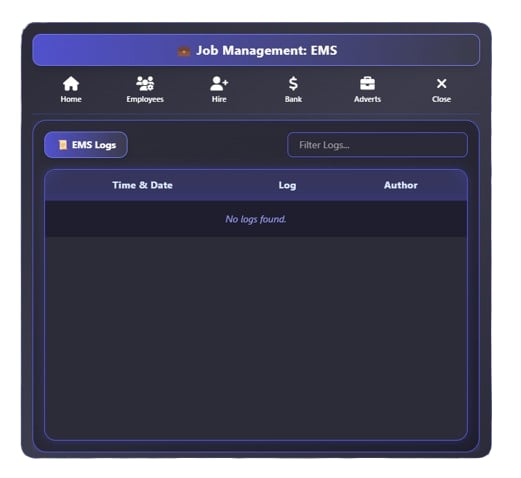
- Job Boss Interface: A full-featured panel accessible by job bosses or authorized players, allowing control over hiring, employee roles, advertisements, and banking.
- Permission System: Fine-grained access control with customizable flags like canHire, canAdvertise, canBank, and canEmployees.
- Employee Management: Hire nearby players Promote, demote, or fire existing employees Review detailed logs of management actions
- Financial Tools: Company bank balance management Visual cash flow charts using Chart.js Support for deposits and withdrawals
- Adverts Center: Create and post job adverts Track user applications Display all active job listings in a stylish UI
- Target System Integration: Configurable target creation with support for peds and boxzones, managed through the admin panel.
Admin Panel
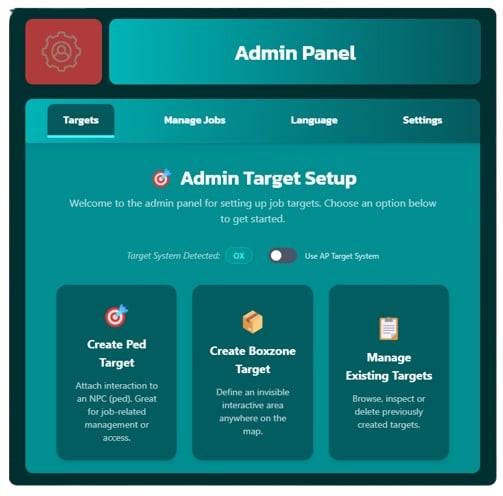
The Admin Panel is a powerful in-game UI designed to give authorized staff or developers the ability to manage and configure key aspects of the AP Management System. It serves as the control center for configuring job targets, job settings, language preferences, and more—all from within the game.
How to Access the Admin Panel
Access to the Admin Panel is restricted to authorized personnel (typically server admins or players with admin rights). The panel is triggered the command below.
-- Command:

/showManagement
Admin Panel Features
The Admin Panel contains multiple tabs, each responsible for a different administrative function:
| Feature | Description |
|---|---|
| 🎯 Targets | Manage and configure interactive job targets (e.g., peds, boxzones) |
| 🛠️ Manage Jobs | View and update job configuration, assign boss roles, control job logic |
| 🌍 Language | Edit translation strings dynamically for multi-language server support |
| ⚙️ Settings | Configure global options such as the active language and unemployed job name |
Job Account API (Exports)
This module exposes utility functions for interacting with job-based company accounts within the AP Management system. These functions allow other resources to retrieve account details, query balances, and perform controlled financial transactions (deposits/withdrawals) tied to a specific job.
Fetches a structured account object for the specified job.
Arguments:
- jobName (string): The internal name of the job (e.g., "mechanic").
Returns:
- A table containing:
{
  account_name = <string>,
  account_balance = <number>,
  account_type = "job"
}
Returns nil if the job is not found.
Example:
local account = exports["ap-management"]:GetAccount("mechanic")
if account then
    print(account.account_balance)
end